


Fast VPN proxy servers with no logs - RUSVPN
Category : ToolsVersion: v2.4.12
Size:10.20MOS : Android 5.1 or later
Developer:Devsoft Group Kft.
 Download
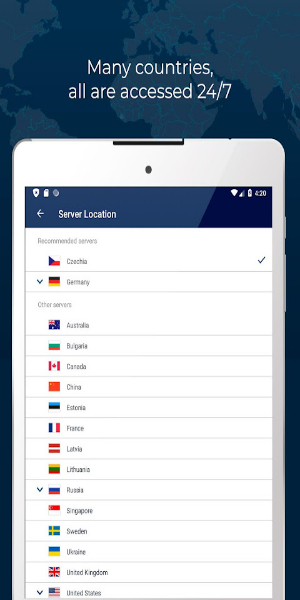
 RUSVPN offers a robust VPN service with over 1,000,000 satisfied users globally, boasting more than 1260 servers across 50 countries. This extensive network ensures users can enjoy unrestricted access to websites and apps, effortlessly bypass firewalls, and maintain a secure internet connection at all times.
Why Choose RUSVPN?
1. Full Access to Internet Resources and Content:
- Unblock Any Content: With RUSVPN, you can access any website or app that's blocked in your region, including social networks and adult sites, ensuring you never miss out on your favorite content.
- Buffer-Free Streaming: Stream movies and sports events without interruptions, thanks to RUSVPN's optimized servers designed for seamless streaming.
- Torrent Safely: Safely download torrents by connecting to servers in countries that are friendly to torrenting, keeping your downloads secure and private.
- Virtual Location Change: Easily switch your virtual location to access content from different regions, making it simple to enjoy global content at your fingertips.
2. Guaranteed Online Privacy:
- Advanced Encryption: RUSVPN uses high-end 256-bit encryption with the IKEv2 protocol to provide fast and secure connections, safeguarding your data against prying eyes.
-Strict No-Logs Policy: Operating from jurisdictions that prioritize privacy, RUSVPN adheres to a strict no-logs policy, ensuring your online activities remain confidential.
- Encrypted Servers: All RUSVPN servers feature encrypted hard disk drives, protecting your data even during server inspections.
- Auto-Connect and Kill Switch: Stay protected with automatic connection to the VPN and prevent IP leaks with the kill-switch feature, ensuring your privacy is never compromised.
3. Vast Secure VPN Network:
- Extensive Server Coverage: With over 1260 servers in 50 countries across 5 continents, RUSVPN provides reliable and fast connections wherever you are.
-Regional Content Access: Easily access content specific to different regions by connecting to servers in those countries, broadening your entertainment options.
-Optimized Connection: Take advantage of better prices on bookings, games, and tickets by connecting through servers in economically advantageous locations.
- Gaming Speed Boost: Enhance your gaming experience with optimized gaming servers, reducing latency and improving your gameplay.
4. Easy User-Friendly Interface:
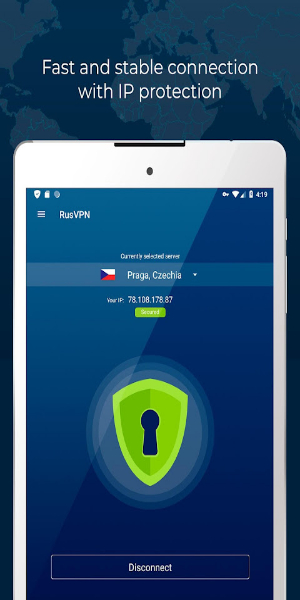
- One-Click Connectivity: Connect to the VPN with just one click for instant security and privacy, making it easy for anyone to use.
- Simple Proxy IP Change: Change your proxy IP with ease, adapting quickly to different browsing needs.
-Seamless User Experience: Enjoy a seamless experience with automatic VPN protection across WiFi and mobile networks, ensuring constant security.
- Favorite Servers: Mark your favorite servers for quick access to your preferred locations, saving you time and effort.
- Multi-Device Support: One premium account covers all your devices, including Android and iOS smartphones, Windows and Mac laptops, and routers, providing comprehensive protection.
How to Install Fast VPN proxy servers with no logs - RUSVPN
1. Download from 40407.com:
-Open 40407.com on your Android device.
-In the search bar, type "RUSVPN" and search for the app.
-Find the RUSVPN app developed by "BelkaVPN" and tap on it.
-Tap on the "Install" button to download and install the app on your device.
2. Alternative Method (APK Installation):
-If you prefer to install the APK manually or if the app is not available in your region’s Play Store, download the APK from the official RUSVPN website or another trusted source.
-Go to Settings on your Android device.
-Navigate to Security or Privacy settings (depending on your device).
-Enable "Unknown Sources" to allow installations from sources other than the Google Play Store.
-Open your device’s file manager and locate the downloaded RUSVPN APK file.
-Tap on the APK file to begin the installation process.
-Follow the on-screen instructions to complete the installation.
3.Set Up RUSVPN:
-Once RUSVPN is installed, open the app.
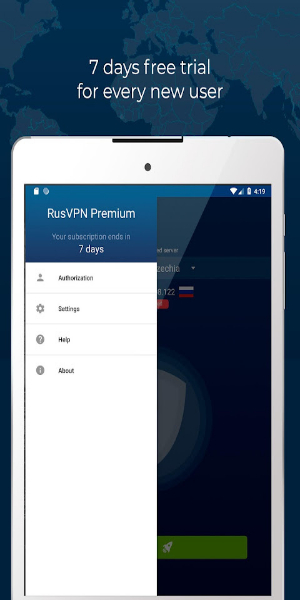
-Log in with your RUSVPN account credentials. If you don’t have an account yet, you can sign up for one within the app.
-Follow any additional setup instructions provided by the app, such as granting necessary permissions.
4.Connect to a VPN Server:
-After setup, you’ll see a list of available server locations.
-Tap on a server location to connect to it. You may also have options to connect automatically to the fastest server or a recommended server.
-Wait a few moments for RUSVPN to establish a secure connection.
5.Start Browsing Securely:
-Once connected, you can minimize the app and browse the internet securely and privately.
-RUSVPN will encrypt your internet traffic, ensuring your online activities are protected from prying eyes.
Conclusion:
RUSVPN stands out as a top choice for those seeking a fast, secure VPN with a strong commitment to privacy. With a vast network of over 1260 servers in 50 countries, advanced features like 256-bit encryption, a no-logs policy, and a reliable kill-switch, RUSVPN ensures your online activities remain private and secure. Whether you're accessing geo-restricted content, streaming without interruptions, or enhancing your gaming experience, RUSVPN delivers seamless connectivity and peace of mind. Its intuitive interface and multi-device support make it a convenient and comprehensive solution for all your devices. Choose RUSVPN today and enjoy unrestricted internet access with confidence.


-
 Top-Rated Simulation Games for PC and Mobile
A total of 10 World Bus Driving Simulator Hamster Cake Factory School Cafeteria Simulator Ship Simulator 2022 City Bus Simulator - Eastwood SimCity Real City JCB Construction 3D Public Transport Simulator 2 Supermart 3D Store Simulator Train Simulator: subway, metro
-
 Exciting Action Packed Games for Android
A total of 10 Ninja Assassin Creed Samurai Gun Games 3D : Shooting Games Iron Hero: Superhero Fight 3D Battle Showdown: Gambit GUNSHIP BATTLE: Helicopter 3D The Walking Zombie 2: Shooter Agent Hunt Shooting Games 3D StickMan HOUSE 314: Survival Horror FPS Agent Shooting- FPS Shooter 3D

"Mickey 17 Preorder Now on 4K UHD, Blu-Ray"

Perchang World turns the simple puzzler into a globe-trotting adventure on Apple Arcade
- Former Ubisoft Execs Found Guilty of Sexual Assault and Harassment, Given Suspended Sentences and Fined Nearly $100,000 2 days ago
- Here's Why Nintendo Is in the Credits for PS5 Exclusive Death Stranding 2 2 days ago
- Hand-Drawn Photography Adventure Game TOEM Opens Pre-Registration on Mobile 3 days ago
- Super Mario Strikers Hits Nintendo Switch Online 5 days ago
- Ragnarok X: Ultimate Cooking Guide Released 6 days ago
- Dragonheir: Silent Gods Reboots Globally on Mobile 6 days ago
- Group of geese (not flying) Crossword Clue - Try Hard Guides 1 weeks ago
- Top Eleven Be a Soccer Manager Best Formations Guide 1 weeks ago
- Pokémon TCG Pocket Debuts Ultra Beasts 1 weeks ago
-

Finance / 2.0.4 / by Bank Asia Limited / 41.00M
Download -

Tools / 4.1 / by The Appschef / 14.00M
Download -

Art & Design / 10.0.2 / by Team Scarface / 26.0 MB
Download -

Tools / 3.3.4.102475 / by PreSonus Audio Electronics, Inc. / 79.60M
Download -

Lifestyle / v1.3.9.d / by BanApp Entertainment / 21.18M
Download -

Lifestyle / 3.19.0 / by Purple Ventures Company Limited / 16.20M
Download


-
 All Monsters in Pressure And How to Survive Them – Roblox
-
 ETE Chronicle:Re JP Server Pre-Registration Opens With A Very Different Game
-
 "Discover All Templar Locations in Assassin’s Creed Shadows - Spoiler Alert"
-
 "Lisa: The Painful & Joyful Surprise Android Release"
-
 Unlocking the Secret Shop in R.E.P.O.: A Guide
-
 Why Call of Duty: Black Ops 6 Looks Grainy & Blurry