

Mixing Station
Category : ToolsVersion: 2.0.12
Size:23.96MOS : Android 5.0 or later
Developer:davidgiga1993
 Download
 About Mixing StationFully customizable UICreate unlimited DCA groups (IDCAs)Customizable layers, layouts, channel order and multi-group labelsRTA overlay in PEQ /GEQ viewChannel linking and relative gangingGain reduction history for gate and dynamicsPeak hold for all meters, editable hold timesPeq preview in channel stripHigh contrast mode for outdoor usagePopgroupsRouting MatrixUp to 32 channels per layerMix copyFeedback detection for ringing out wedgesMore features available depending on the connected mixer modelConclusion
Mixing Station is a robust mixing application offering a comprehensive suite of features designed to simplify and streamline audio mixing. Beyond the capabilities outlined in the previous article, Mixing Station delivers additional tools that make it an indispensable asset for live sound engineers, studio producers, and musicians.
About Mixing Station
Fully customizable UI
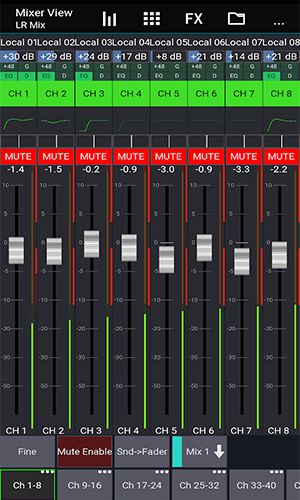
Mixing Station features a fully customizable interface, enabling users to design personalized layouts, layers, and channel arrangements. This flexibility ensures quick access to frequently used functions, keeping essential tools within easy reach.
Create unlimited DCA groups (IDCAs)
Users can create an unlimited number of DCA groups (IDCAs), allowing for the simultaneous control of multiple channels. This functionality is especially valuable in live sound scenarios, where engineers need to adjust levels rapidly and efficiently.
Customizable layers, layouts, channel order and multi-group labels
Mixing Station empowers users to tailor their layers, layouts, channel sequencing, and multi-group labels. This organizational flexibility helps maintain clear labeling, minimizing the risk of errors and confusion during operation.
RTA overlay in PEQ /GEQ view
The application includes a real-time analyzer (RTA) overlay within the PEQ/GEQ (parametric/graphic equalizer) view. This feature aids in identifying problematic frequencies, allowing for precise EQ adjustments.
Channel linking and relative ganging
Users can link channels together to form relative-ganging groups, enabling the simultaneous adjustment of multiple channels. This ensures that levels and other parameters remain consistent across linked groups.
Gain reduction history for gate and dynamics
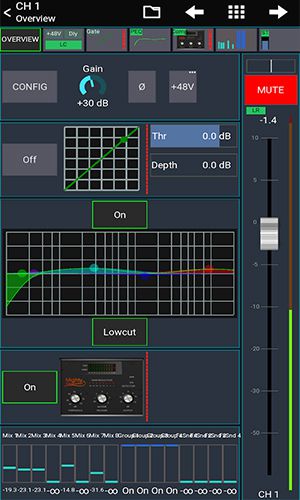
Mixing Station provides a gain reduction history for gate and dynamics processing, displaying how much reduction has been applied over time. This visual feedback helps users fine-tune processing for optimal results.
Peak hold for all meters, editable hold times
All meters feature a peak hold function with adjustable hold times, making it easier to monitor levels and detect peaks or distortion without missing transient signals.
Peq preview in channel strip
A PEQ preview function is integrated into the channel strip, allowing users to audition equalization settings before applying them. This feature facilitates sound shaping and ensures the desired tonal balance is achieved.
High contrast mode for outdoor usage
Designed for outdoor use, the high contrast mode enhances screen visibility in bright sunlight. This reduces eye strain and improves usability in challenging lighting conditions.
Popgroups
The pop groups feature allows users to assign channels to groups that can be unmuted with a single button press. This is particularly useful in live sound settings, where quick adjustments are often required.
Routing Matrix
Mixing Station includes a routing matrix, enabling users to route signals between channels and buses. This simplifies the configuration of complex signal paths and ensures accurate connections.
Up to 32 channels per layer
Supporting up to 32 channels per layer, Mixing Station offers ample capacity for various mixing tasks, making it a versatile solution for diverse audio environments.
Mix copy
The mix copy function allows users to duplicate settings from one mix to another, facilitating quick setup of new mixes and ensuring consistent configuration across projects.
Feedback detection for ringing out wedges
An integrated feedback detection feature assists in ringing out wedges and other monitor speakers, helping to minimize feedback and maintain a clear, balanced mix.
More features available depending on the connected mixer model
Additional features are available based on the connected mixer model, providing users with enhanced flexibility and control over the mixing process.
Conclusion
Mixing Station is a powerful and versatile mixing application offering a wide array of features designed to enhance the efficiency and intuitiveness of the mixing process. Its fully customizable UI, adaptable layers, multi-group labels, RTA overlay in PEQ/GEQ view, and gain reduction history for gate and dynamics are just a few of the many


-
 Top-Rated Simulation Games for PC and Mobile
A total of 10 World Bus Driving Simulator Hamster Cake Factory School Cafeteria Simulator Ship Simulator 2022 City Bus Simulator - Eastwood SimCity Real City JCB Construction 3D Public Transport Simulator 2 Supermart 3D Store Simulator Train Simulator: subway, metro
-
 Exciting Action Packed Games for Android
A total of 10 Ninja Assassin Creed Samurai Gun Games 3D : Shooting Games Iron Hero: Superhero Fight 3D Battle Showdown: Gambit GUNSHIP BATTLE: Helicopter 3D The Walking Zombie 2: Shooter Agent Hunt Shooting Games 3D StickMan HOUSE 314: Survival Horror FPS Agent Shooting- FPS Shooter 3D


- Canceled Batman Arkham Knight Follow-Up Concept Art Shows a Grizzled Bruce Wayne 4 days ago
- Anbernic Suspends U.S. Deliveries Over Tariffs 5 days ago
- Marvel Snap Introduces Guaranteed New Card Packs 6 days ago
- Wingspan’s Asia Expansion is set to release on iOS and Android later this month 1 weeks ago
- My Little Pomodoro: Cozy Productivity Timer Hits iOS, Android 1 weeks ago
- Persona 5 X Release Date and Time 1 weeks ago
-

Finance / 2.0.4 / by Bank Asia Limited / 41.00M
Download -

Tools / 4.1 / by The Appschef / 14.00M
Download -

Art & Design / 10.0.2 / by Team Scarface / 26.0 MB
Download -

Tools / 3.3.4.102475 / by PreSonus Audio Electronics, Inc. / 79.60M
Download -

Lifestyle / v1.3.9.d / by BanApp Entertainment / 21.18M
Download -

Lifestyle / 3.19.0 / by Purple Ventures Company Limited / 16.20M
Download


-
 All Monsters in Pressure And How to Survive Them – Roblox
-
 ETE Chronicle:Re JP Server Pre-Registration Opens With A Very Different Game
-
 "Discover All Templar Locations in Assassin’s Creed Shadows - Spoiler Alert"
-
 "Lisa: The Painful & Joyful Surprise Android Release"
-
 Unlocking the Secret Shop in R.E.P.O.: A Guide
-
 Why Call of Duty: Black Ops 6 Looks Grainy & Blurry