
If you're a fan of *Palworld* and have been keeping up with its updates, you'll be excited to know that the latest feature introduced in the March 2025 update lets you transfer your Pals between different worlds using the new Global Palbox. This feature adds a new layer of interaction and strategy to the game, making it even more engaging. Here's a detailed guide on how to get and use the Global Palbox in *Palworld*.
How To Get the Global Palbox in Palworld
After the March 2025 update, the Global Palbox has become accessible to all players of *Palworld*. To unlock this feature, navigate to the Build screen and find the Pal section. The Global Palbox stands out with its futuristic design and a radio dish. To construct it, you'll need the following resources:
| Resource | Location |
| Wood | Obtained by cutting trees. |
| Stone | Obtained by mining rocks. |
| Paldium Fragment | Obtained by mining Paldium rocks. |
These resources are commonly found throughout the game, so most players should have them in ample supply. If you find yourself short on materials, remember that Pals can assist in gathering them, making the process much easier.
How To Use the Global Palbox in Palworld
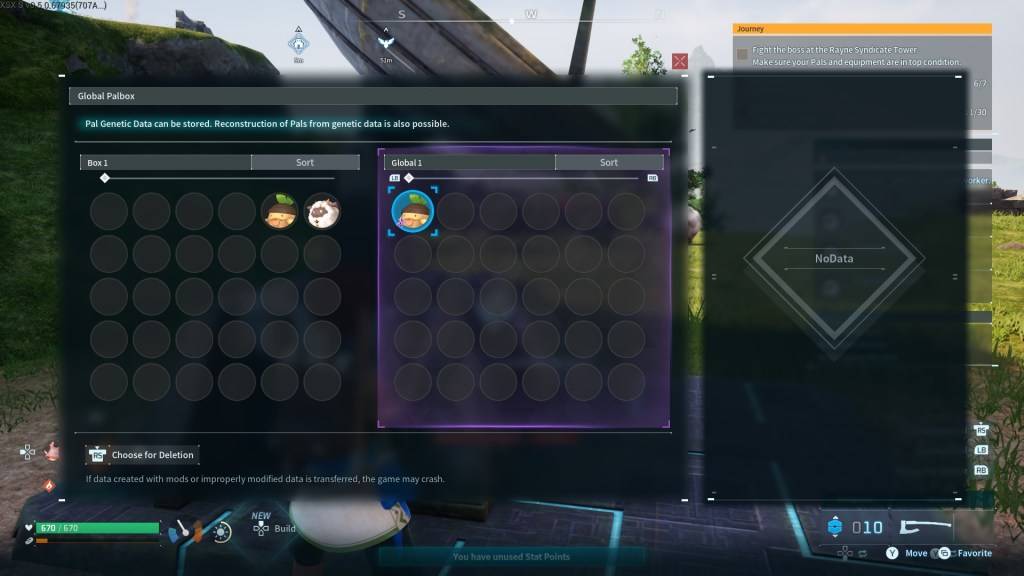
Unlike *Pokemon*, where you transfer creatures between games, *Palworld* allows you to store your Pal's Genetic Data in a Global database. This data can then be used to reconstruct your Pal in another world, allowing you to maintain your original Pal while creating another version in a different world. Keep in mind that only one version of a specific Pal can be reconstructed per world.
If you're eager to use your favorite Pals across multiple worlds, follow these steps to use the Global Palbox in *Palworld*:
Copying a Pal’s Genetic Data
- Load into the first *Palworld* world.
- Construct and open the Global Palbox in the first world.
- Locate the desired Pal in your boxes.
- Move the Pal’s Genetic Data to the Global database.
Reconstructing a Pal
- Load into the second *Palworld* world.
- Construct and open the Global Palbox in the second world.
- Locate the desired Pal’s Genetic Data and move it to your boxes.
- Find the Pal in your boxes and move them into your party to reconstruct.
You can repeat this process multiple times, enhancing your gameplay across different worlds. This feature not only adds depth to the game but also makes the act of catching Pals more thrilling, as they now have the potential to thrive in multiple worlds.
And that's how you can get and use the Global Palbox in *Palworld*. For additional tips, learn how to make Pals transport items to another location in the game.
*Palworld is currently available in Early Access on PlayStation, Xbox, and PC.*